
Imagine slipping on your headset, her gorgeous trans body filling your vision—those full, heaving breasts, the tantalizing sway of her hips, and that thick, throbbing cock pulsing just inches from your face. Every detail pulls you in, making your own cock swell with aching need.

But here’s the secret I’ve discovered after immersing myself in thousands of trans VR scenes: resolution isn’t just a number. It’s the difference between glimpsing her beauty and feeling her hot breath tease your skin, your cock twitching in rhythm with her every seductive move. Higher pixels mean sharper curves, more intimate eye contact, and climaxes that hit harder. Let me guide you through it, sharing what makes your pulse race in each one.
This guide breaks down exactly how VR resolution works, what each level really feels like, and where you should be spending your bandwidth and storage if you want the best experience.
Quick Breakdown: What Resolution Actually Matters
- 2K: Fast, lightweight, lower clarity
- 4K: Solid baseline for most users
- 5K: Noticeably sharper on newer headsets
- 8K: Maximum detail, heavy requirements
The jump between each tier is very noticeable in VR—especially in close-range scenes where clarity and depth matter most.
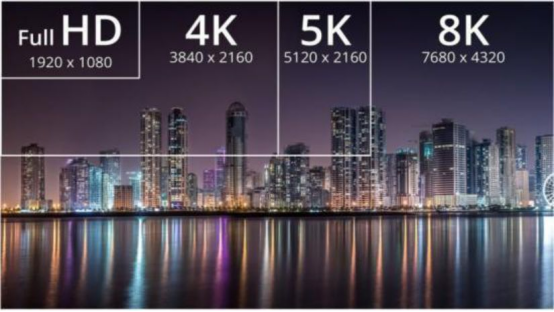
The Reality of VR Resolution (Why 4K Isn’t Really 4K)
In standard video, 4K (3840 × 2160) looks extremely sharp. But VR works differently.
That resolution is stretched across a full 180° or 360° environment and split between both eyes. The result is that “4K VR” often feels closer to 1080p per eye.
That’s why lower-resolution VR can feel soft or slightly out of focus—especially when scenes are framed up close. Once you move into higher resolutions, the difference becomes much more obvious.
From 2K to 8K: What Each Level Feels Like
2K (2048 × 1024)
- Roughly 720p–1080p per eye
- Fast to stream, small file sizes (1–3GB)
- Common on free sites
Good enough to get started, but once you’re used to higher resolutions, it feels noticeably soft—especially in close-up scenes.
4K (3840 × 1920)
- ~1080p–1440p per eye
- 3–6GB per scene
- Best balance for most users
This is where things start to feel properly immersive. Motion is smooth, detail holds up, and scenes feel more natural at typical viewing distance.
5K (5120 × 2560)
- ~1440p–1800p per eye
- 5–10GB files
- Ideal for Quest 3-level hardware
This is where the jump becomes noticeable. Facial detail, eye contact, and overall scene clarity improve in a way that makes everything feel more immediate.
8K (7680 × 3840)
- ~2160p per eye
- 10–20GB per scene
- Requires strong hardware and internet
At this level, detail is pushed as far as current VR setups allow. When the scene is shot properly, it feels significantly more “there” compared to lower resolutions.
The Economics of Free VR Content
Most free VR sites stick to 2K—and it’s not by accident.
A single 10-minute 8K video can be 15GB or more. Compare that to ~2GB for a 2K file, and the bandwidth difference is massive.
That’s why free platforms prioritize lower resolutions: faster streaming, lower costs, and better accessibility.
Higher resolutions are usually reserved for premium content where quality is the main selling point.
Why Resolution Changes the Experience
Higher resolution doesn’t just make things “look better”—it changes how scenes feel.
- Detail clarity: facial expressions and movement look more natural
- Depth perception: scenes feel less flat and more dimensional
- Close-range realism: important for POV-style VR
Once you move up from 2K into 4K or 5K, the difference is hard to ignore—especially in scenes designed to feel more direct and interactive.

Matching Resolution to Your Headset
Your headset determines how much of that resolution you actually see.
| Headset | Max Effective Resolution | Sweet Spot |
|---|---|---|
| Meta Quest 2 | ~4K equivalent | 4K–5K |
| Meta Quest 3 | ~5K+ equivalent | 5K–8K |
| Apple Vision Pro | ~6K+ equivalent | 5K–8K |
| Valve Index | ~4K equivalent | 4K |
| HTC Vive Pro 2 | ~5K equivalent | 5K |
Running higher resolutions than your headset can display won’t improve quality—it just increases file size and load times.
Streaming Without Killing the Experience
| Resolution | Minimum Speed | Recommended |
|---|---|---|
| 2K | 10 Mbps | 15 Mbps |
| 4K | 25 Mbps | 50 Mbps |
| 5K | 50 Mbps | 80 Mbps |
| 8K | 80 Mbps | 150 Mbps |
If your connection can’t keep up, buffering breaks immersion fast. In those cases, downloading is the better option.
Storage Considerations
- 2K: ~2–3GB per scene
- 4K: ~4–6GB
- 5K: ~6–10GB
- 8K: ~10–20GB
If you’re building a larger collection, storage adds up quickly—especially at higher resolutions.
When Higher Resolution Is Worth It
- 2K: quick access, free content, slower connections
- 4K: best overall balance
- 5K: ideal for newer headsets like Quest 3
- 8K: for maximum clarity and premium setups
For most users, 4K–5K is where the experience really starts to feel right. Beyond that, it depends on your hardware and how much detail you want.
Choosing the Right Setup
If you’re using a Quest 3, 5K is usually the sweet spot—sharp enough to feel immersive without the overhead of full 8K files.
On a Quest 2, 4K is still the most efficient option.
Factor in your internet speed, storage space, and how you prefer to watch (streaming vs downloads), and build your setup around that.
Final Thoughts
Resolution is one of the biggest factors in how VR content actually feels. Once you move past lower-quality streams and into properly shot, higher-resolution scenes, the difference is immediate.
It’s not just about sharper visuals—it’s about how natural everything looks when it’s right in front of you, how smooth the movement feels, and how easily you stay locked into the scene.
Dial in the right resolution for your setup, and those extra pixels make her breasts heave real, her cock throb tangible, your climaxes shatteringly intense.
Want to test the difference yourself? Explore our Trans VR Porn Library and compare across resolutions.